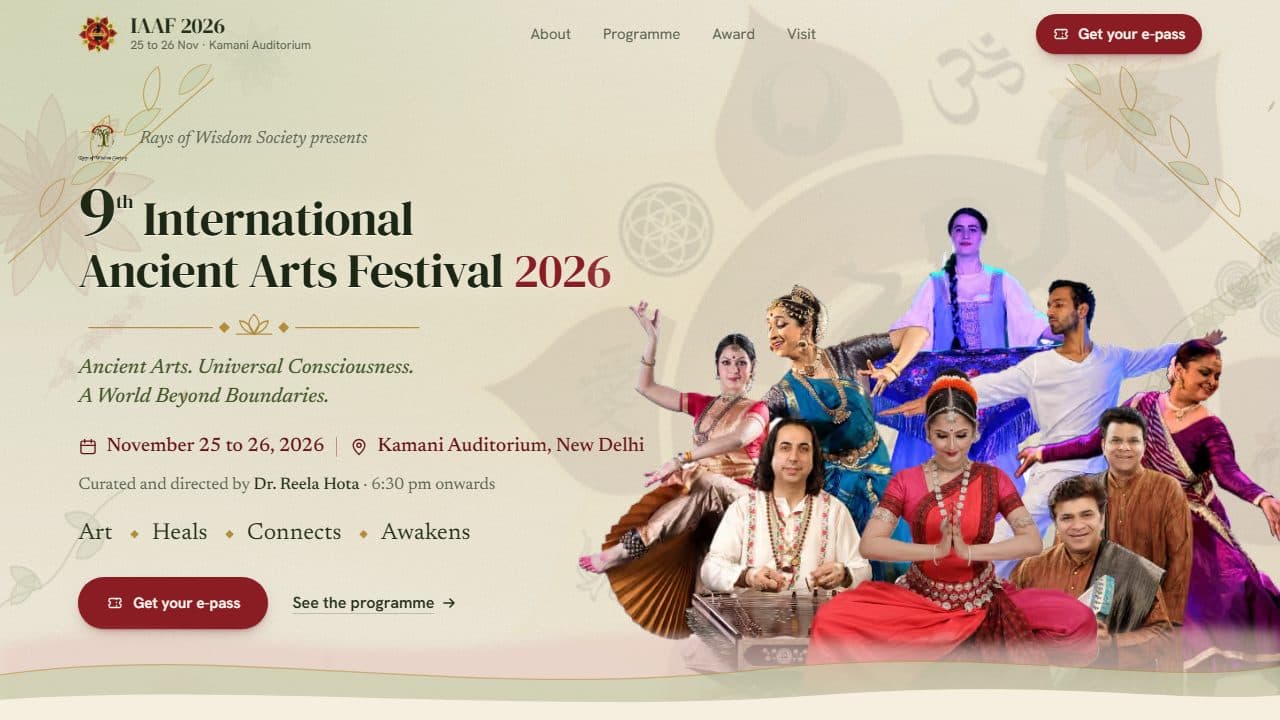
IAAF 2026: Festival Site with E-Pass and Gate Check-In
Problem:
Rays of Wisdom Society needed a page for the 9th International Ancient Arts Festival (two evenings at Kamani Auditorium, New Delhi) that could hand out free entry passes and let volunteers check guests in at the door, without paper lists or a ticketing platform.
Solution:
Designed and built, as a freelance client project, a Next.js event site with a live e-pass maker that issues a numbered pass with a QR code, and a PIN-protected gate console where staff scan passes with a phone camera and get one clear verdict per guest.
Impact:
One pass admits up to 4 people, check-ins are race-safe across gate phones, private pages stay out of search, and Lighthouse scores 100 for accessibility, best practices and SEO.
Overview
A freelance build for Rays of Wisdom Society: the official page of IAAF26, the 9th International Ancient Arts Festival, held on 25 and 26 November 2026 at Kamani Auditorium, New Delhi. The page presents the programme, artists, the Ancient Arts Award and venue details, and runs a free e-pass system end to end. A guest types a name, picks the party size and evening, and watches the ticket redraw live; one tap issues a pass number and downloads the pass. At the venue, staff sign in to a gate console with a PIN and scan the pass's QR code with a phone camera to get a single verdict: valid, already checked in, not for tonight, or not found.
Results & metrics
- Free e-pass for up to 4 guests per pass, with a QR code and add-to-calendar
- Race-safe gate check-in across several phones, with undo and per-evening entry
- Lighthouse 100 for accessibility, best practices and SEO
- Private gate, pass and API pages kept out of search
Before / after
Entry passes
Before: Paper lists or a third-party ticketing platform
Door check-in
Before: Names ticked off a printed list
Two phones, one pass
Before: Both could admit the same guest
Staff sign-in limit
Before: Correct PINs counted too, so a team on one Wi-Fi could lock itself out
What I built
Live e-pass
The ticket redraws as a guest types; one tap issues a pass number and downloads it.
Gate check-in
Staff scan the QR and get one verdict: valid, already in, not tonight, or not found.
Admitted once
Check-in is a conditional update, so two gate phones can't both admit one pass.
Stack
- Next.js 16 App Router, React 19 and TypeScript
- Tailwind CSS 4, with the festival poster's palette
- Supabase Postgres, for passes and check-ins, with a local JSON store for development
- QR generation, with qrcode and in-browser scanning with jsQR
- Signed HttpOnly staff cookies and a rate-limited PIN sign-in
- Vercel hosting, with schema.org Event data, a build-time share image and llms.txt

Decisions
Key trade-offs and design calls that shaped the final delivery.
Own e-pass system instead of a ticketing platform
Why
- Context
- Entry is free and the society needed the pass to match the printed one, with no sign-up for guests and no fees
- Decision
- Built the pass maker and gate console into the event site: no accounts for guests, no e-mail addresses stored, and a QR that a guest can also scan to confirm the pass is genuine (with a masked name)
Conditional update over read-then-write check-in
Why
- Context
- Several volunteers scan at the same door, so two phones can scan one pass within the same second
- Decision
- Check-in is a single conditional update that only succeeds if the pass isn't already admitted for that evening, so the second phone gets "Already checked in at 6:42 pm" instead of admitting twice
Safe error hints, not raw database errors
Why
- Context
- Raw database errors can name tables or hosts, but the site owner still needs to know what to fix
- Decision
- Errors are mapped to a short hint (table missing, bad key, unreachable) shown to the owner, with the full error only in the server log; a counter that can't load is hidden rather than showing a wrong number
noindex until sign-off, not a public draft
Why
- Context
- The client was still sending copy, photos and sponsor artwork while the page was being built
- Decision
- One environment variable switched the site from noindex to indexable at launch with no code change; the gate, pass and API pages stay noindex permanently
Architecture
The primary system boundaries, runtime pieces, and how the project was structured in production.
- Event page + e-pass maker → Pass API
- Pass API → Supabase passes + check-ins
- Event page + e-pass maker → Passes on the phone
- Gate console + QR scanner → Gate API
- Gate API → Supabase passes + check-ins
- Next.js App Router + canvas
Event Page and E-Pass Maker
How
The pass is drawn after the printed one and redraws as the visitor types; the e-pass picture and QR library load only when the section scrolls near. Passes stay on the phone in localStorage, so reopening the page shows them again and never counts twice.
- Route handlers + Supabase
Pass API
How
POST /api/epass validates the request, refuses cross-site POSTs, issues an RWS26 pass number from an alphabet without 0, O, 1 or I so it can be read aloud at the gate, and stores it.
- PIN sign-in + jsQR scanner
Gate Console
How
Staff sign in once for a 14-hour signed cookie. The QR opens a verdict card with undo; a pass for both evenings is checked in once per evening, and the console shows live numbers for who is inside tonight.
Mermaid source
Paste into mermaid.live to edit the diagram.
flowchart LR
  subgraph Guest
    G[Event page + e-pass maker]
    L[(Passes on the phone)]
  end
  subgraph Server
    A[Pass API]
    K[Gate API]
  end
  subgraph Data
    D[(Supabase passes + check-ins)]
  end
  subgraph Venue
    S[Gate console + QR scanner]
  end
  G --> A --> D
  G --> L
  S --> K --> D
Pipeline
How changes moved from development through validation and deployment.
Artist photographs and gallery inbox resized to web sizes and listed in a generated file before dev and build
Typecheck and lint on every change
Static event page, a 1200 x 630 share image drawn at build time, sitemap and robots
Auto-deploy from GitHub; secrets for Supabase and the gate PIN live in Vercel settings
Select a step for its detail
Incidents
Operational failures, rehearsals, or recovery moments that changed how the system was run.
- P1
Gate team could lock itself out
Resolution
The PIN limiter counted every sign-in, and a gate team on the venue's shared Wi-Fi looks like a single client; it now counts only wrong PINs (10 per 10 minutes per client), and scanning and check-in have no limit
Lesson: Rate limits keyed on IP need to account for many real users behind one address, and should count failures, not successes
- P2
Pass maker limit too tight for shared networks
Resolution
Raised the pass limit from 5 to 40 per 10 minutes, since mobile carriers and the venue share addresses across many guests
Lesson: Pick limits from how the real audience connects, not from a single-user test
- P2
Guest counter showed a misleading number when the database failed
Resolution
The API now reports whether a count came from the database, the page hides a counter that can't load, and the owner sees a plain hint about what is wrong
Lesson: A missing number is better than a wrong one; make the failure visible to the person who can fix it